What it is good at
- Typography that stays readable at small sizes
- Follows unusual instructions literally
OpenAI · Image · 14 credits per image
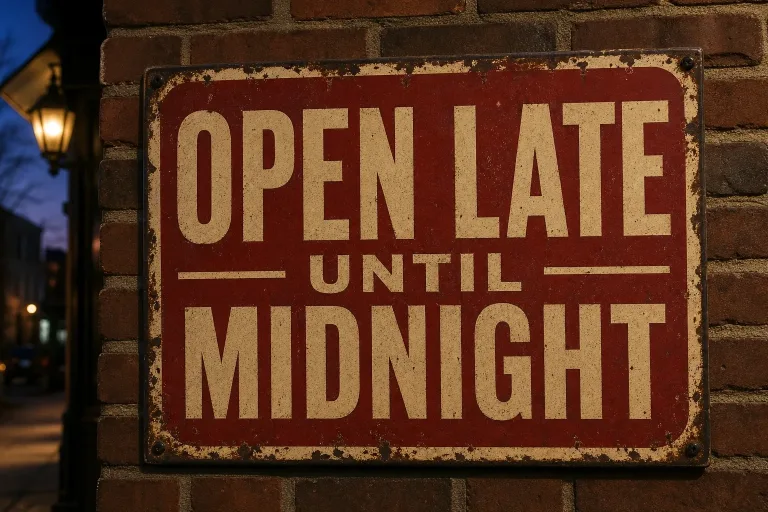
Open GPT Image 2 (medium) when the picture has to carry words: posters, menus, thumbnails, mock interfaces. At 14 credits per image it keeps small type legible and follows odd instructions to the letter.
14 credits per image.
This engine sits under a long list of Ugesi tools. For a poster from scratch, open AI Image Generator and start from the Poster with text preset. For a thumbnail, YouTube Thumbnail Generator with Face and text or Versus. For ads, AI Ad Generator with Bold typographic. To repair a misspelled sign in an existing picture, AI Image Editor has a Fix the text preset. To clear space for a headline, use Add text space.
Photo work runs here too. That includes AI Photo Editor and AI Relight, with presets like Golden hour or Window light. Virtual Staging AI, AI Interior Design, Remove Object and Remove Person also use it. AI Clothes Changer is the one tool that takes two uploads, the photo and the garment to swap in.
It does what you write, including the strange parts, so spell out layout and wording. Try: "A 2:3 jazz night poster. Headline 'BLUE ROOM' in tall condensed letters at the top, 'Fridays 9 pm' small at the bottom right. A saxophone silhouette in the center, two colors only."
For a menu board: "A chalkboard café menu with four items and prices in neat handwriting. Coffee cup doodle in the corner, every word spelled correctly." Put exact text in quotes inside your prompt and keep each line short.
Its listed limit is photorealism. Skin, fabric and natural light can look a little illustrated. For a lifestyle photo with no text, FLUX 2 [max] at 16 credits is the photoreal pick. Its own text rendering is weaker. For fast, cheap drafts from a prompt, Nano Banana costs 12 credits at a lower resolution. It takes no upload on Ugesi. If a keeper must go to print, the AI Image Upscaler gives 4x output, not a new image. Topaz Image Upscale at 13 credits is listed for that job but not open yet.
Three ratios are offered: 1:1, 3:2 and 2:3. Use 2:3 for posters and flyers, 3:2 for banners and slide images, 1:1 for social posts and product tiles. There is no wide 16:9 option. For a video thumbnail or a header, generate at 3:2 first. Then add room in Expand Image with More on the sides, and crop to 16:9.
Each GPT Image 2 render at medium quality takes 14 credits from your balance. That is close to $0.15 at the best pack. Ten separate runs, typical when you test wording and layout, come to 140 credits, about $1.49. It sits at No. 32 of 41 image models, counting from the cheapest. It is not the budget choice, because you pay for type that holds up.
| Pack | Credits | Runs |
|---|---|---|
| $9 | 750 | 53 |
| $19 | 1,650 | 117 |
| $39 | 3,500 | 250 |
| $79 | 7,300 | 521 |
| $149 | 14,000 | 1,000 |
curl -X POST https://ugesi.com/api/generate \
  -H "Authorization: Bearer YOUR_API_KEY" \
  -H "Content-Type: application/json" \
  -d '{
    "model": "gpt-image-2",
    "prompt": "a product shot on white marble"
  }'
<?php
$ch = curl_init('https://ugesi.com/api/generate');
curl_setopt_array($ch, [
CURLOPT_POST => true,
CURLOPT_RETURNTRANSFER => true,
CURLOPT_HTTPHEADER => [
'Authorization: Bearer YOUR_API_KEY',
'Content-Type: application/json',
],
CURLOPT_POSTFIELDS => json_encode([
'model' => 'gpt-image-2',
'prompt' => 'a product shot on white marble',
]),
]);
$response = json_decode(curl_exec($ch), true);
curl_close($ch);
print_r($response);type GenerateRequest = {
model: string;
prompt: string;
};
type GenerateResponse = {
job_id: number;
job_token: string;
credits_held: number;
status: "queued" | "succeeded";
output_text?: string;
};
const body: GenerateRequest = {
model: "gpt-image-2",
prompt: "a product shot on white marble",
};
const resp = await fetch("https://ugesi.com/api/generate", {
method: "POST",
headers: {
"Authorization": `Bearer ${process.env.UGESI_API_KEY}`,
"Content-Type": "application/json",
},
body: JSON.stringify(body),
});
if (!resp.ok) throw new Error(`HTTP ${resp.status}`);
const job = (await resp.json()) as GenerateResponse;
console.log(job.job_id, job.status);import requests
resp = requests.post(
"https://ugesi.com/api/generate",
headers={"Authorization": "Bearer YOUR_API_KEY"},
json={
"model": "gpt-image-2",
"prompt": "a product shot on white marble",
},
timeout=60,
)
resp.raise_for_status()
print(resp.json()){
"model": "gpt-image-2",
"prompt": "a product shot on white marble"
}The API comes with every credit pack, from Lite to Enterprise, and uses the same balance as the website. API documentation and access →
Outputs made with paid credits can be used commercially. The maker's own rules for GPT Image 2 (medium) also apply (OpenAI Usage Policies). The full rules are in our Terms of service.
Readable typography, even at small sizes, is its main listed strength. Keep each text line short and put the exact words in quotes in your prompt. Check the result letter by letter before printing.
Not directly, because the ratio list stops at 1:1, 3:2 and 2:3. Generate at 3:2, then add room with the More on the sides preset in Expand Image. Finally, crop the result to 16:9.
Yes, if the product shot has no text and needs to look like a real photo. FLUX 2 [max] is the photoreal default at 16 credits. If the shot carries a label, price or slogan, stay here.
AI Clothes Changer takes the person photo and the garment image. AI Pet Portrait also accepts more than one image. Most other tools take a single photo, and AI Image Generator takes none.
Pay only for what you generate. New accounts start with free credits, no card needed.
Start for freeEssential cookies keep you signed in and protect forms. With your consent we also use statistics: where visits come from (for example a campaign) and which tools work. You can change your choice at any time under “Cookie settings” in the footer. Cookie policy
Essential (always on)
Sign-in, form security and remembering this choice.
An anonymous visit ID and the campaign source (utm), so we know what works. This data stays with us.
