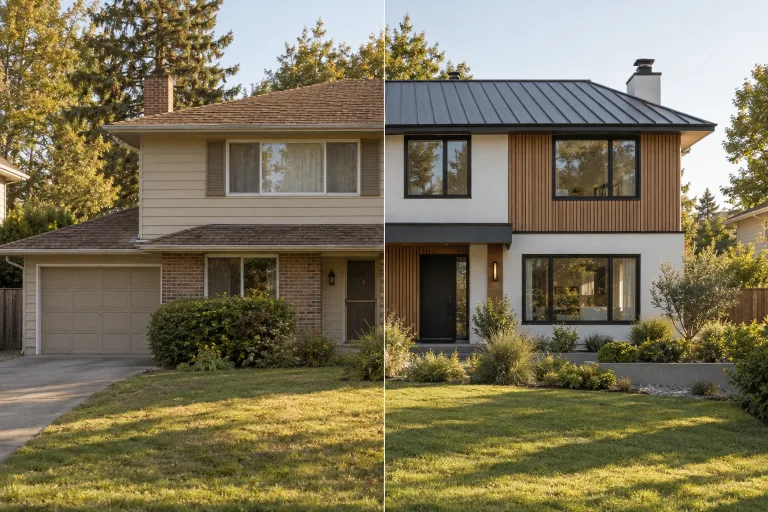
How to use AI House Exterior Design
Photograph the whole front
Under Photo of your house, upload a level daylight shot of the entire front, taken from across the street. Avoid strong shadows and fisheye lenses. JPG, PNG or WebP up to 10 MB. If cars or trash cans hide the ground floor, remove them first with the object remover.
Check up to four facade styles
Under Facade styles, every checked style becomes its own design. Three are checked at first, and four is the maximum. Start with contrasting looks such as Modern minimalist, Modern brick and Japandi, then refine the one that fits.
Set options and what to keep
Options set the roof covering, window frames, wall color, garden and light. The roof and garden can also stay exactly as they are. Answer "Anything to keep or add?" with details. For example: "keep the wooden balcony, add a house number by the door".
Generate and compare with your photo
Pick a Model and press "Generate 3 facade designs"; the number follows the styles you checked. If windows move or the roofline changes, use a sharper, straighter photo. Treat each design as a visualization to discuss with a contractor, not a construction drawing.
12 facade styles, from minimalist to coastal
Every style keeps your house and changes the finish. Not sure where to start? Check Modern minimalist, Scandinavian and Wood and render for three different contemporary looks. Then refine the one you like with the options.
Modern minimalist facade
Smooth white render, large black window frames and clean edges. The classic way to make a dated house look new.
Scandinavian facade
Vertical larch cladding next to white render, black frames and a wooden door. Warm, simple and light.
Wood and render facade
Horizontal cedar on chosen walls, light gray render and anthracite frames. Contemporary without being cold.
Modern farmhouse exterior
White board-and-batten cladding, black frames, a timber porch and lanterns. Rural charm with modern lines.
Dark modern facade
Black-stained timber or charcoal panels with warm wood around the door. Bold, and striking at dusk.
Modern brick facade
Long-format light gray brick, deep window reveals and bronze frames. Solid, low maintenance and timeless.
Stone and render facade
Natural stone on the ground floor, warm white render above and a timber canopy. Grounded and calm.
Japandi facade
Light timber slats on white render, a quiet entrance and a small gravel garden with a maple.
Mediterranean modern facade
Warm white lime render, oak shutters, clay accents and olive trees by the door. Sunny in any climate.
Industrial modern facade
Dark standing-seam metal with architectural concrete and thin steel frames. Sharp and urban.
Refreshed classic facade
Greige render, white trims, a deep green front door and carriage lanterns. Traditional, only tidier.
Coastal facade
Blue-gray weatherboards, crisp white trims and a navy door. Relaxed and bright.
What a real job costs here
The cheapest model on this page charges 14 credits and the most expensive 38 credits. At the best pack rate that is about $0.1490 up to $0.4044.
| Pack | Credits | Runs with Nano Banana Pro |
|---|---|---|
| $9 | 750 | 19 |
| $19 | 1,650 | 43 |
| $39 | 3,500 | 92 |
| $79 | 7,300 | 192 |
| $149 | 14,000 | 368 |
Choosing between the models on this page
GPT Image 2 (medium): Posters, menus, interfaces and any image with readable text. Typography that stays readable at small sizes. Watch out for: not the most photoreal option.
FLUX 2 [max]: Everyday photoreal image generation and iteration. Photorealistic default. Watch out for: text rendering is weaker than GPT Image 2.
GPT Image 2.5: Edits and product shots where the subject must stay recognizable. Sharper detail and more natural light. Watch out for: small, dense text can still break.
Nano Banana Pro: Hero images where realism decides the result. Photoreal skin and texture. Watch out for: higher rate than everyday image models.
See the new facade before the scaffolding goes up
A facade renovation is a big and very visible decision. Render, cladding, new windows and a roof change cost real money and stay for decades. Upload a photo of your house and compare finished looks on your own walls. That is more useful than a catalog house that looks nothing like yours.
Several designs from one photo
Check up to four styles and each one becomes its own design. They are generated one after another and shown side by side with your original photo. That makes the comparison instant. Each design costs the listed rate.
The house stays, the finish changes
Every run is told to keep the footprint, roofline, number of stories, windows, doors and camera angle. What changes is the finish: render and cladding, roof covering, window frames, the front door, lighting and planting. Treat the result as a visualization to discuss with your architect or contractor, not as a construction drawing.
Old house, modern look
Older houses gain the most. Take a 1970s cube with small windows. White render, black frames, a timber accent and a tidy front garden make it look completely different. Start with three contrasting styles, keep the one that fits, then adjust the roof, frames and wall color.
How to take the photo
Stand across the street, hold the camera level and fit the whole front of the house in the frame. Overcast daylight gives the cleanest result. If cars, trash cans or scaffolding hide the ground floor, remove them first with the object remover.
Frequently asked questions
How does AI house exterior design work?
You upload a photo of the front of your house and pick one or more styles and any options. The model then redraws the facade on the same house. The shape, windows and framing stay, the materials and colors change.
Can I get several designs at once?
Yes. Check up to four styles and you get one design per style, shown next to your original photo. Each design is a separate run, priced on its own. The total appears above the button before you start.
Will the new facade fit my actual house?
Each design keeps the footprint, roofline, window positions and camera angle of your photo. It is a visualization for choosing a direction, not a technical drawing. Confirm details such as insulation thickness and materials with your contractor.
Can I keep parts of the current facade?
Yes. Write what to keep in the text field, for example "keep the brick plinth" or "keep the wooden balcony". Under options you can also keep the current roof and the garden exactly as they are.
Can it show curb appeal ideas before a sale?
Yes. Check two or three styles and set Surroundings to Tidy modern garden. Then set Light to Dusk, lights on for a twilight look. Each design shows a possible renovation, not the house as it is. Present it to buyers as an idea, and keep a real photo as the main listing image.
Can I make a twilight listing photo of the house as it is?
Not with this tool. Every design applies at least one facade style, so the finish always changes. To change only the light, upload the photo to AI Relight and describe dusk with the windows lit.
Which photo works best?
A level shot of the whole front in daylight, taken from across the street. Avoid strong shadows and fisheye lenses. The sharper the photo, the more precisely the design follows your house.
