How to use Remove Object
Upload the original photo
Add the photo under "Your image" (JPG, PNG or WebP, up to 10 MB). Ideally, use the original, sharpest file rather than a screenshot. Distinct objects on textured or repeating backgrounds, such as pavement, foliage or sky, disappear most cleanly.
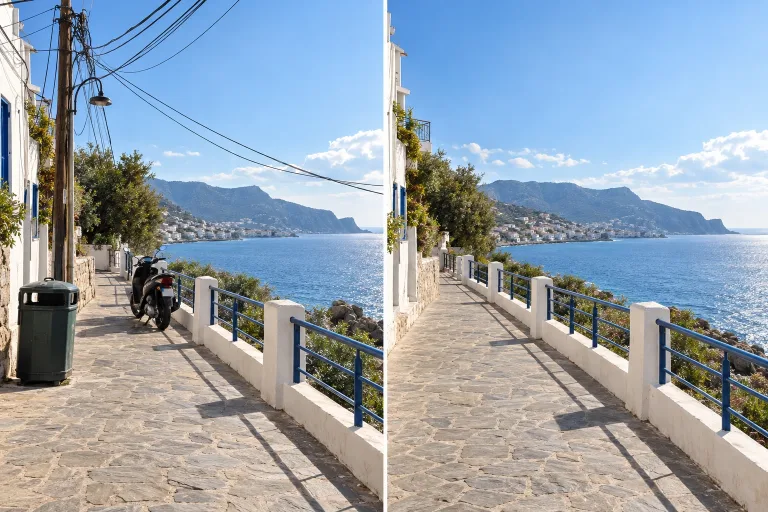
Name the object and its position
In "What should disappear?", name each object with its place in the frame. For example: "the trash bin on the right and the wires in the sky". If the object touches your main subject, also say what must stay.
Choose the model
Under "Model", GPT Image 2 (medium) follows instructions literally and keeps text in the photo readable. It is not the most photoreal, though. Pick Nano Banana Pro when realism decides the result: it renders skin and texture photorealistically.
Check the filled area, then refine
Press "Remove it" and zoom into the filled area. Look for leftover shadows or reflections and bent lines in fences, tiles or windows. If something remains, run it again with a more specific sentence, for example one that names the shadow too.
What a real job costs here
The cheapest model on this page charges 14 credits and the most expensive 38 credits. At the best pack rate that is about $0.1490 up to $0.4044.
| Pack | Credits | Runs with GPT Image 2 (medium) |
|---|---|---|
| $9 | 750 | 53 |
| $19 | 1,650 | 117 |
| $39 | 3,500 | 250 |
| $79 | 7,300 | 521 |
| $149 | 14,000 | 1,000 |
Choosing between the models on this page
GPT Image 2 (medium): Posters, menus, interfaces and any image with readable text. Typography that stays readable at small sizes. Watch out for: not the most photoreal option.
GPT Image 2.5: Edits and product shots where the subject must stay recognizable. Sharper detail and more natural light. Watch out for: small, dense text can still break.
Nano Banana Pro: Hero images where realism decides the result. Photoreal skin and texture. Watch out for: higher rate than everyday image models.
Removal is a description, not a selection
No lasso, no mask. Write the object out of the scene, e.g. "remove the trash bin on the right". The model redraws the photo without it and reconstructs what was behind: pavement, wall, foliage, sky. Because the whole photo is redrawn, check the parts you wanted kept.
What removes cleanly
Distinct objects on textured or repeating backgrounds vanish best. People in streets, cars on roads, wires against sky, logos on walls. Objects that touch your main subject need a precise sentence about what must remain.
Finish the shot
After removal, the result offers a 4x upscale before print or background removal for a clean cut-out. It can also become a short animation. Each is one click away.
Frequently asked questions
Can it remove a person?
Yes - describe the person by position (the person on the left) rather than by identity. State what should stay.
Will the fill look fake?
On natural backgrounds the reconstruction is usually seamless. Complex man-made patterns may need a second, more specific pass - that second run is a fresh generation.
What does Nano Banana Pro cost here?
Nano Banana Pro costs 38 credits per image, against 14 for GPT Image 2 (medium). Pick it when realism decides the result.
What does GPT Image 2 (medium) cost here?
14 credits per image. The exact total appears above the button before you generate.
