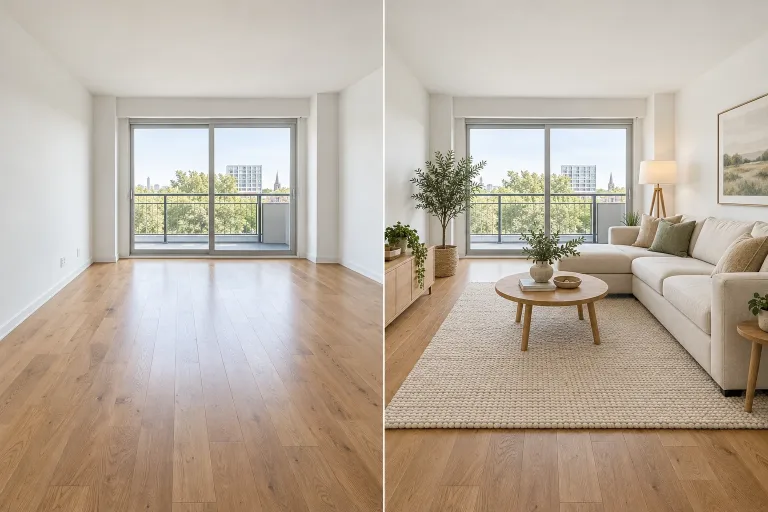
How to use Virtual Staging AI
Upload a level photo of the room
Add the room photo under Your image. Shoot from a corner at standing height with the camera level, lights on and most of the floor visible. This way furniture can be placed at the right scale. JPG, PNG or WebP up to 10 MB.
Pick a style or describe the furniture
Click a Style preset to fill Notes (optional) with a complete staging brief you can edit. Or write your own, e.g. "Scandinavian living room: light oak sofa, wool rug, one plant". Left empty, the box uses the Modern living room preset.
Match the Format to your photo
Under Format, pick Landscape 3:2 for a typical horizontal listing photo or Portrait 2:3 for a vertical one. Square 1:1 suits social posts. The closer it is to the shape of your photo, the less the framing of the room changes.
Check walls and windows, then refine
Press "Stage the room" and compare windows, doors, floor and furniture scale with the original. If a fixture moved or something you wanted to keep vanished, name it in the box. For example: "keep the fireplace and window frames". Label the photo as virtually staged in your listing.
What a real job costs here
The cheapest model on this page charges 14 credits and the most expensive 19 credits. At the best pack rate that is about $0.1490 up to $0.2022.
| Pack | Credits | Runs with GPT Image 2 (medium) |
|---|---|---|
| $9 | 750 | 53 |
| $19 | 1,650 | 117 |
| $39 | 3,500 | 250 |
| $79 | 7,300 | 521 |
| $149 | 14,000 | 1,000 |
Choosing between the models on this page
GPT Image 2 (medium): Posters, menus, interfaces and any image with readable text. Typography that stays readable at small sizes. Watch out for: not the most photoreal option.
GPT Image 2.5: Edits and product shots where the subject must stay recognizable. Sharper detail and more natural light. Watch out for: small, dense text can still break.
Empty rooms sell slower
Buyers struggle to judge scale in an empty space. Staging is the standard fix and it used to cost hundreds per room.
Built for empty rooms
Six presets furnish an empty room. Declutter is for a lived-in room: it clears loose items and keeps the furniture. No preset removes furniture, so for a furnished room describe the change instead. For example: "replace the sofa with a low gray one, keep the dining table". Then check the result closely.
Disclose it
Most markets require staged listing photos to be labeled as virtually staged. Do it. A buyer who feels misled walks away.
Decluttering a listing photo
Declutter removes laundry, cables, papers, toiletries, toys and personal photos. Furniture, fixtures, walls and windows stay as photographed. It tidies but does not repair or repaint. Damp, cracks and worn floors stay visible, as they should in a listing. Check that nothing permanent, such as a radiator or an outlet, has disappeared.
Furniture from a description
The model draws the furniture from the preset or your notes. It cannot place a specific product. The only image field is for the room, so a sofa from a shop page cannot be copied in. Describe the piece instead, such as "low three-seat sofa in gray bouclé, round oak coffee table". You can then see how that kind of furniture works in the room. Sizes are approximate, so measure before you buy.
Frequently asked questions
Does the architecture change?
The presets ask the model to keep walls, windows and proportions and change only furnishing and styling. Check the result before you publish it.
Can I keep some furniture?
Name what stays, for example "keep the dining table". Everything unnamed is open to change.
What resolution do I get?
Generate and then upscale. Portals compress hard, so start larger than you need.
How is this different from home staging?
Physical home staging brings real furniture into the property, and buyers see it at a viewing. Here the furniture exists only in the photo, and the room is still empty at a viewing. That is why the listing should say the photo is virtually staged.
Is this a real estate photo editor?
It covers two interior jobs for listing photos: staging an empty room and decluttering a lived-in one. For the outside of the house, AI House Exterior Design shows renovation ideas. Label edited photos wherever your market requires it.
What does GPT Image 2 (medium) cost here?
14 credits per image. The exact total appears above the button before you generate.
