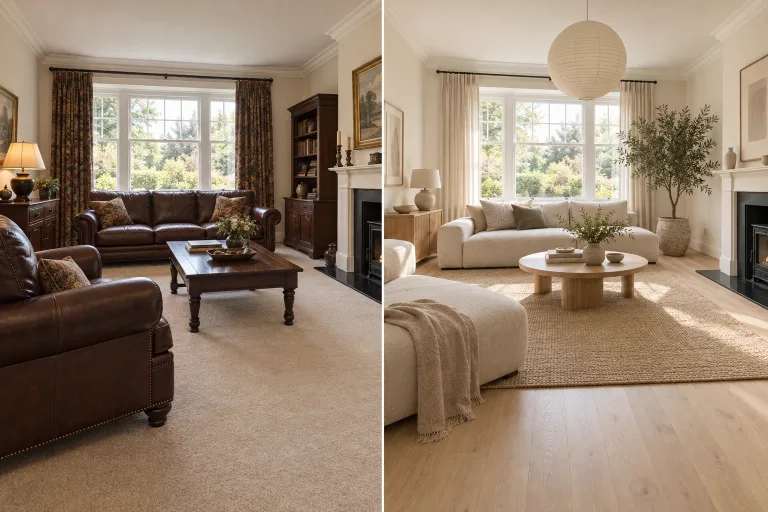
How to use AI Interior Design
Photograph the whole room
Under "Your image", upload a wide, well-lit photo of the room. Stand in a corner, keep the camera level and fit in as much of the room as you can. JPG, PNG or WebP, up to 10 MB. Wide, evenly lit shots redesign best.
Say what changes and what stays
In "Describe the room you want", name the style, materials and colors, and list what must stay, e.g. "Scandinavian, light oak floor, white walls, keep the gray sofa and the window". Anything unnamed is open to change. A "Style preset" chip loads a full brief for a common room and replaces your text.
Match the format to your photo
Under "Format", choose the shape closest to your photo. Use Landscape 3:2 for a typical horizontal room shot and Portrait 2:3 for a tall one. Otherwise pick Square 1:1. Square is selected by default, so change it before you generate.
Compare it with the original
Press "Redesign room" and check that walls, windows and doors sit where they were. If something moved or a piece you wanted to keep changed, name it explicitly. For example: "keep the window and radiator exactly as photographed". Then run again. Treat the result as a visualization, not a construction plan.
What a real job costs here
The cheapest model on this page charges 14 credits and the most expensive 19 credits. At the best pack rate that is about $0.1490 up to $0.2022.
| Pack | Credits | Runs with GPT Image 2 (medium) |
|---|---|---|
| $9 | 750 | 53 |
| $19 | 1,650 | 117 |
| $39 | 3,500 | 250 |
| $79 | 7,300 | 521 |
| $149 | 14,000 | 1,000 |
Choosing between the models on this page
GPT Image 2 (medium): Posters, menus, interfaces and any image with readable text. Typography that stays readable at small sizes. Watch out for: not the most photoreal option.
GPT Image 2.5: Edits and product shots where the subject must stay recognizable. Sharper detail and more natural light. Watch out for: small, dense text can still break.
The architecture is the constraint
Ask for walls, windows and proportions to stay, as every preset does. What changes is furniture, materials, color and light, which is exactly what a mood board is for. The model redraws the photo, so check doors and windows in the result.
Emptying a room is one sentence
Selling or renting? None of the presets empties a room. Write it yourself: remove all furniture, keep the walls, floor and windows. For furnishing an empty room, the virtual staging tool is built for that.
Shoot it right
Stand in a corner, keep the camera level and get as much of the room in frame as possible. Wide, well-lit shots redesign best.
Decor without moving furniture
Decor refresh changes only what you can carry in: cushions, throws, a rug, curtains, art, plants and lamps. Every piece of furniture stays where it is, and so do the walls, floor and windows. It suits a room whose layout already works and only needs a new look. Name anything you want to keep, such as the striped rug, because unnamed decor may be swapped.
A rendering of your own room
The result is a photorealistic interior rendering built on your photo. You can judge finishes and furniture in your real light and proportions. It needs a photo of an existing room. Only have a hand sketch or a view from a 3D model? AI Architectural Rendering turns that into an image instead.
Frequently asked questions
Is this virtual staging?
Close, but for rooms that are already furnished. To furnish an empty room, use AI Virtual Staging. The result is a visualization, not a construction document.
Can I keep my own sofa?
Name it in the prompt, for example "keep the gray sofa". Everything unnamed is open to change.
Which presets are there?
Living room refresh, Kitchen remodel, Bedroom calm, Home office, Bathroom spa, Small balcony and Decor refresh. A preset replaces the text box with a full brief that you can edit.
Can it design a room without a photo?
No. The design is built on the walls and windows in your photo, so an upload is required. For a sketch or a 3D model view, use AI Architectural Rendering. For a room imagined from text alone, use the AI Image Generator.
What does GPT Image 2 (medium) cost here?
14 credits per image. The exact total appears above the button before you generate.
