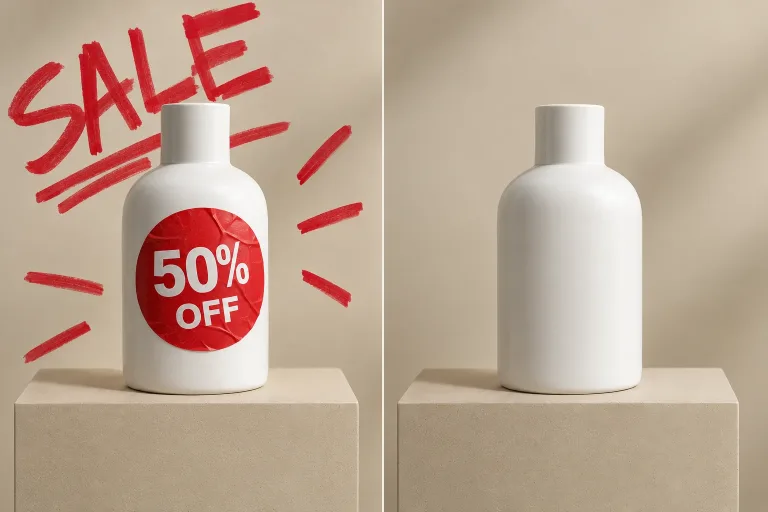
How to use Remove Text
Upload the image
Add the picture under Your image: JPG, PNG or WebP, up to 10 MB. Use the largest, least compressed version you have, and only images you own or may change. Removing other people's watermarks is not supported.
Say which text goes and where
In "What text should go?", name the text and where it sits. If some lettering must stay, say so too. For example: "remove the price tag on the left, keep the logo on the bag".
Pick the closest format
If you set a Format, pick the one closest to your original: Square 1:1, Landscape 3:2 or Portrait 2:3. That way the scene is not reframed.
Check the patch, then refine
Press "Remove text" and zoom in where the text was. Look for smudges, ghost letters and patterns that no longer line up. Plain surfaces usually come out clean. If a detailed one shows the patch, run it again with a more precise instruction for that spot.
What a real job costs here
The cheapest model on this page charges 14 credits and the most expensive 19 credits. At the best pack rate that is about $0.1490 up to $0.2022.
| Pack | Credits | Runs with GPT Image 2 (medium) |
|---|---|---|
| $9 | 750 | 53 |
| $19 | 1,650 | 117 |
| $39 | 3,500 | 250 |
| $79 | 7,300 | 521 |
| $149 | 14,000 | 1,000 |
Choosing between the models on this page
GPT Image 2 (medium): Posters, menus, interfaces and any image with readable text. Typography that stays readable at small sizes. Watch out for: not the most photoreal option.
GPT Image 2.5: Edits and product shots where the subject must stay recognizable. Sharper detail and more natural light. Watch out for: small, dense text can still break.
Text sits on top of a scene
Removing it means rebuilding whatever it covered: a wall, a sky, a shirt. That is why this runs on an editing model rather than a blur brush.
What removes cleanly
Overlaid captions, subtitles burned into a frame, signage and small labels. Text wrapped around complex objects needs a second, more specific pass.
Use it on work you own
Only remove text from images you own or have permission to change. We do not support stripping watermarks or credits from other people's work.
Frequently asked questions
Can it remove subtitles from a video frame?
From a still frame, yes. For a whole clip, export frames or use the video tools.
Will the background look real?
On plain surfaces it is seamless. Detailed patterns can need a second run with a more precise instruction.
Will it keep the shape of my photo?
Pick the Format closest to your photo: Square 1:1, Landscape 3:2 or Portrait 2:3. These are the only shapes on offer, so the exact original size is not kept.
What does GPT Image 2 (medium) cost here?
14 credits per image. The exact total appears above the button before you generate.
