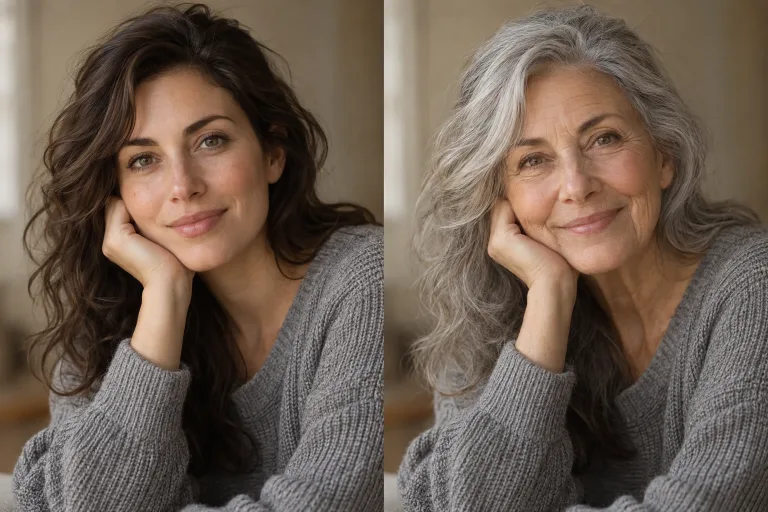
How to use AI Age Progression
Upload a clear portrait
Under "Your image", add a sharp photo of one face looking at the camera, in even light. The face should not be hidden by sunglasses, hands or hair. JPG, PNG or WebP up to 10 MB. Keep the face centered with some space around the head.
Confirm consent and pick an age
Check the consent box: everyone in the photo must have agreed to the edit. Then choose a "Style preset": "Older by 10 years", "Older by 30 years", "Younger", "As a child" or "Elderly". It writes a full instruction into the text box.
Fine-tune with notes
"Notes" now holds the preset text. Add specifics there, e.g. "about 65, keep the glasses and the beard". Without a preset, describe the target age yourself: the run needs either a preset or your own text.
Compare with the original
Press "Age the photo" and set the result next to the original. Eyes, nose and smile should still read as the same person. If the face drifts, use a sharper, front-facing photo. If the change is too weak or too strong, state an exact age in the notes.
What a real job costs here
The cheapest model on this page charges 14 credits and the most expensive 38 credits. At the best pack rate that is about $0.1490 up to $0.4044.
| Pack | Credits | Runs with Nano Banana Pro |
|---|---|---|
| $9 | 750 | 19 |
| $19 | 1,650 | 43 |
| $39 | 3,500 | 92 |
| $79 | 7,300 | 192 |
| $149 | 14,000 | 368 |
Choosing between the models on this page
GPT Image 2 (medium): Posters, menus, interfaces and any image with readable text. Typography that stays readable at small sizes. Watch out for: not the most photoreal option.
GPT Image 2.5: Edits and product shots where the subject must stay recognizable. Sharper detail and more natural light. Watch out for: small, dense text can still break.
Nano Banana Pro: Hero images where realism decides the result. Photoreal skin and texture. Watch out for: higher rate than everyday image models.
What changes and what stays
The model keeps bone structure and features, then rewrites skin, hair and volume to match the target age. Identity survives, time moves.
Where people use it
Family projects, character design, fiction and long-term storytelling. It is a creative tool, not a forensic one.
Consent applies
Only use photos of yourself or of people who agreed. The consent box is enforced on this page.
Frequently asked questions
How accurate is it?
It is a plausible interpretation, not a prediction. Treat the output as creative work.
Can I go both ways?
Yes. The five presets cover older by ten years, older by thirty years, younger, as a child and elderly. You can also type a target age yourself.
Which models can I pick, and what do they cost?
Three. GPT Image 2 (medium) costs 14 credits and GPT Image 2.5 costs 19 credits. Nano Banana Pro costs 38 credits per image.
What does Nano Banana Pro cost here?
38 credits per image. The exact total appears above the button before you generate.
