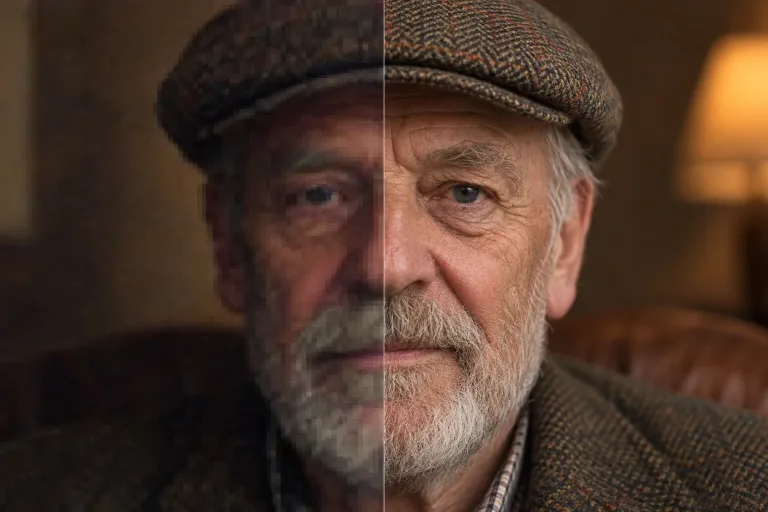
How to use Face Restore
Upload the photo with the soft face
Under Your image, add the photo where the face is blurry, compressed or badly lit. This could be a phone zoom shot or a video still. JPG, PNG or WebP up to 10 MB. Use the largest, least-compressed copy you have.
Confirm consent and check the damage
Check the consent box: everyone shown must have agreed to the edit. Restoration is automatic and works from the image alone. For scratches, grain or torn prints, use Restore Old Photos instead: this tool works on faces only.
Compare close-ups, then upscale
Press "Restore faces" and compare the eyes, teeth and skin with the original at full size. Very small sources drift more, so if the person looks different, start from a larger original. For more pixels, continue with Upscale 4x.
What a real job costs here
Runs on this page cost 3 credits. At the best pack rate that is about $0.0319.
| Pack | Credits | Runs with Face Restore |
|---|---|---|
| $9 | 750 | 250 |
| $19 | 1,650 | 550 |
| $39 | 3,500 | 1,166 |
| $79 | 7,300 | 2,433 |
| $149 | 14,000 | 4,666 |
What this model is good at and where it stops
Face Restore
Why faces need their own pass
Generic sharpening smears eyes and skin. A face model knows what a face should look like and rebuilds it.
Where it helps most
Phone zoom, group photos, video stills and old profile pictures. Anything where the moment is right but the face is soft.
Cheap enough to run on everything
Flat price per image and no minimum. Run it on the whole batch before you pick a keeper.
What a run costs here
3 credits per image. The exact total sits above the button before you generate.
Frequently asked questions
Is this the same as photo restore?
Same family, narrower job. Face restore targets faces only; photo restore also handles grain and damage.
Will the person still look like themselves?
In most cases yes. Very low-resolution sources drift more, so judge on close-ups.
Can I set the strength or pick which face to fix?
No. There is no strength control and no text instructions. The tool works from the photo alone and runs one fixed setting on the faces it finds.
What does restoring the faces in one photo cost?
3 credits per image. The exact total appears above the button before you generate.
