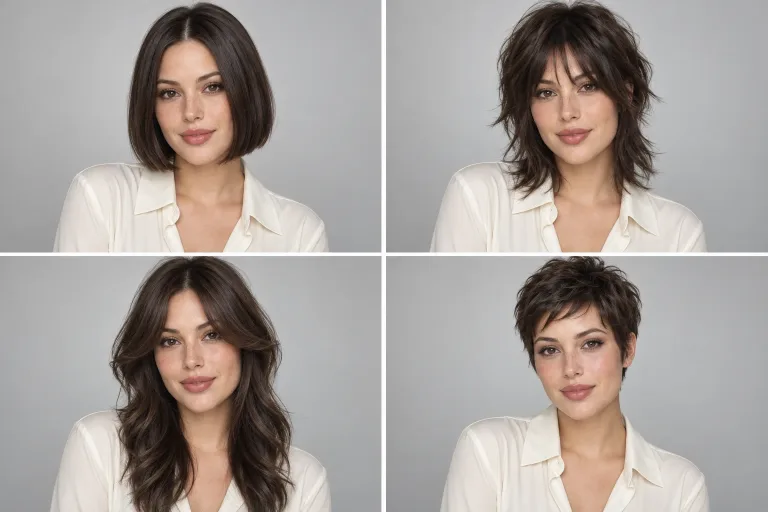
How to use AI Haircut
Upload a clear front-facing photo
Under Your photo, add a sharp shot facing the camera in good light. Hair should be down and the forehead visible, with no filters or sunglasses. JPG, PNG or WebP up to 10 MB. Then check the consent box: everyone shown must have agreed.
Check up to six haircuts
Under Haircuts, choose Women or Men, then check the cuts to try. Three are checked at first and six is the maximum. Each one becomes its own result. Mix a safe choice with a bold one, such as Long bob and Wolf cut.
Pick a shade and add details
Under Hair color, your current shade stays unless you pick another, such as copper or platinum blonde. The "Anything else?" box is optional and suits small details. For example: "bangs just above the brows, more volume on top". Then choose a Model.
Compare, then show your barber
Press "Show 3 haircuts" (the number follows your checks) and check each result with the before-and-after slider. If the new hair looks pasted on, retake the photo facing a window with your hair down. Show your barber the card for the cut you pick; its lengths are a guide.
24 haircuts: 12 for women and 12 for men
Every haircut comes with a short description of the cut. The same text goes on the barber card, so you know what to ask for.
Women
Long bob
Long bob ending just above the shoulders. Ends cut straight and lightly layered, a few face-framing pieces. Blow-dried with a brush for soft movement at the ends.
Long layers
Long hair below the shoulders, cut in layers. The shortest face-framing pieces start at the cheekbones. Volume from a round-brush blow-dry.
Curtain bangs
Curtain bangs with a center part: shortest in the middle at brow level or just below. Longer at the sides and blended into the rest. Length elsewhere unchanged or at the shoulders.
Butterfly cut
Butterfly cut: long hair with shorter, lifted layers around the face from the cheekbones to the chin. Longer layers at the back. Styled with a large round brush.
Classic bob
Classic chin-length bob, ends cut blunt, no layers. Side part. Smooth with shine.
Pixie
Pixie: short at the nape and around the ears, longer textured top of 5–7 cm. Bangs swept to the side. Finished with matte paste.
One length
Long hair cut to one length at mid-back, ends even and blunt, no layers. Sleek with shine.
Straight bangs
Straight, full bangs at brow level, lightly thinned at the ends so they lie flat. The rest straight, shoulder length.
Wolf cut
Wolf cut: lots of choppy layers, most volume at the crown, thin tapered ends and curtain bangs. Back length at the shoulders or a little below.
Shag
Modern medium-length shag: many light, feathered layers and thinned bangs. Styled with mousse or sea salt spray for texture.
Buzz cut
Buzz cut: clippered evenly all over to about 6 mm. Natural, clean hairline with no shaved outline.
Big curls
Natural, bouncy curls to the shoulders in a rounded shape. Cut dry, curl by curl, no thinning. Dried with a diffuser.
Men
French crop
Textured French crop: mid skin fade on the sides and back, from zero to about 6 mm. Top 3–4 cm cut with scissors for texture, short choppy bangs. Matte clay finish.
Low fade
Classic short cut with a low taper fade by the ears and at the nape. Top 3–4 cm combed slightly forward and to the side. Natural finish.
Quiff
Quiff: top 6–8 cm, longest at the front, styled up and back with volume. Short clippered sides with a taper. Blow-dry and medium-hold pomade.
Curtains
Curtains: longer top, 10–12 cm at the front, center part, hair falling to both sides of the forehead. Sides scissor-tapered. Soft natural finish.
Side part
Side part: top 5–6 cm combed to the side with a clean part. Short tapered sides. Pomade with a light shine.
Crew cut
Crew cut: short clippered sides and back, top 2–3 cm, slightly longer at the front, brushed up and forward.
Slick back
Slick back: top 8–10 cm combed straight back with a light shine. Short tapered sides. Pomade on damp hair.
Buzz cut
Buzz cut: the whole head clippered to one length, about 6 mm. Clean, natural hairline.
Modern mullet
Modern mullet: short textured top and sides, burst fade around the ears. Longer hair at the back down to the nape. Matte finish.
Shoulder length
Men's shoulder-length hair with natural waves and a center part. Light layering at the ends. Sea salt spray or curl cream.
Man bun
Man bun: long hair, at least about 15 cm on top, tied into a bun at the crown. A few loose strands by the face. Sides unchanged or lightly trimmed.
Curly fade
Curly top of 5–6 cm cut with scissors to keep the curl. High skin fade on the sides and back. Curl cream.
What a real job costs here
The cheapest model on this page charges 14 credits and the most expensive 38 credits. At the best pack rate that is about $0.1490 up to $0.4044.
| Pack | Credits | Runs with Nano Banana 2 |
|---|---|---|
| $9 | 750 | 28 |
| $19 | 1,650 | 63 |
| $39 | 3,500 | 134 |
| $79 | 7,300 | 280 |
| $149 | 14,000 | 538 |
Choosing between the models on this page
GPT Image 2 (medium): Posters, menus, interfaces and any image with readable text. Typography that stays readable at small sizes. Watch out for: not the most photoreal option.
FLUX 2 [max]: Everyday photoreal image generation and iteration. Photorealistic default. Watch out for: text rendering is weaker than GPT Image 2.
GPT Image 2.5: Edits and product shots where the subject must stay recognizable. Sharper detail and more natural light. Watch out for: small, dense text can still break.
Nano Banana 2: Volume image work that still needs to look real. Fast photoreal output. Watch out for: less fine texture than Pro.
Nano Banana Pro: Hero images where realism decides the result. Photoreal skin and texture. Watch out for: higher rate than everyday image models.
See the haircut before you sit in the chair
A new cut takes months to grow out, and a catalog photo shows someone else's face. Here the haircuts go on your photo: the same face, the same light, only different hair. You choose calmly at home, not in a hurry in front of the salon mirror.
Several ideas from one photo
The first three haircuts in the Popular group are checked by default. You can check up to six, from any group. Each result is a separate run with its own price. The total shows above the button before you start.
A card for your barber
Every result has a card you can print or show on your phone. It holds your photo now, the new haircut and a description in barber terms. The description covers points such as the length on top, how the sides are tapered and the finish. Lengths are a guide, because every head of hair sits differently.
Women's and men's, classic and bold
The women's catalog includes a long bob, butterfly cut, pixie and wolf cut. The men's catalog has a French crop, low fade, quiff, side part and a modern mullet. Your hair color stays as it is in the photo unless you pick another one in the options.
How to take the photo
Face a window, look straight into the lens and keep your forehead visible. Hair tied back tells the model less about its length and thickness, so wear it down. A photo without filters or sunglasses gives the most believable result.
Frequently asked questions
How does the AI haircut tool work?
You upload a photo of your face, pick a catalog and check haircuts. The model draws each one on your photo and keeps your face, skin, facial hair and background unchanged.
How many results do I get?
One for each haircut you check: from one to six, three by default. Each result is a separate run with its own price, and the total shows above the button.
What's on the barber card?
Your photo, the chosen haircut and a short description of the cut: lengths, tapering and finish. Print it from your browser or show it on your phone.
Will the haircut look the same in the salon?
It's a preview, not a promise. Thickness, curl and the way your hair grows change the result. Talk the idea through with your barber before the cut.
Can I change my hair color too?
Yes. Pick a color in the options, such as copper or platinum blonde. Without a choice, your hair color stays as it is in the photo.
