How to use Rizz AI
Upload a clear photo, check both boxes
Under Your photo, add a picture of one person with the face clearly visible and no filters. Use JPG, PNG or WebP up to 10 MB. Then check the consent box and the 18+ box: the tool is for adults and photos of adults only.
Pick a level, add only needed extras
Under Settings, choose Natural, Rizz or Stronger for the overall strength. Skin, eyes, hair and light are separate extras. Pick only what you want improved, and everything else stays as in your photo.
Add one small fix if needed
The "Anything else to fix? (optional)" box is for small details, such as "smooth the creases on the shirt". Otherwise, leave it empty. Don't use it to reshape your face or body. The tool is set to keep features, skin tone, age and body as they are.
Compare, then tone it down if needed
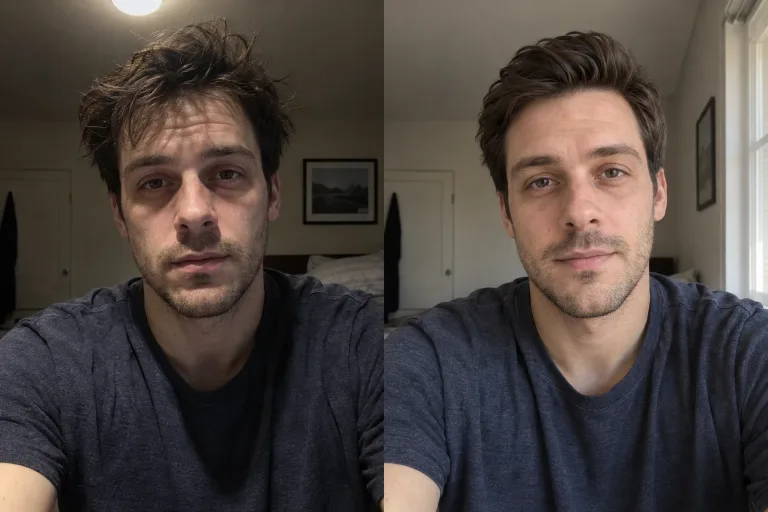
Press "Improve my photo" and drag the before-and-after slider: you should still look like yourself on a good day. If it looks overdone, click "Too much? Tone it down" under the result to run it again one level lower.
What a real job costs here
The cheapest model on this page charges 16 credits and the most expensive 38 credits. At the best pack rate that is about $0.1703 up to $0.4044.
| Pack | Credits | Runs with Nano Banana 2 |
|---|---|---|
| $9 | 750 | 28 |
| $19 | 1,650 | 63 |
| $39 | 3,500 | 134 |
| $79 | 7,300 | 280 |
| $149 | 14,000 | 538 |
Choosing between the models on this page
FLUX 2 [max]: Everyday photoreal image generation and iteration. Photorealistic default. Watch out for: text rendering is weaker than GPT Image 2.
Nano Banana 2: Volume image work that still needs to look real. Fast photoreal output. Watch out for: less fine texture than Pro.
Nano Banana Pro: Hero images where realism decides the result. Photoreal skin and texture. Watch out for: higher rate than everyday image models.
You on a good day
The best profile photo looks like you in person, just after a good night's sleep and in better light. Rizz AI fixes the things that change from day to day: tiredness, redness, flyaway hair and flat light. Your face stays yours.
What we don't change
Face shape, jawline, nose, lips, eyes, eyebrows, skin tone, age and body stay as they are in the photo. No slimming, no contouring and no filter that makes skin look like plastic. The photo should match how you look when someone meets you.
Three effect levels
Natural is a barely noticeable change. Rizz gives a rested, well-groomed look like a great profile photo. Stronger looks like a session with a photographer and good styling. If the result is too strong, the button under the photo runs the tool again one level lower. That is a new run, so its price is shown next to the button.
Extras for precision
Skin, eyes, hair and light are separate settings. Pick only what you want to improve and the rest stays as in the original. The text field is there for small things, such as a crooked collar.
Adults only
The tool is for adults and for photos of adults only. Upload photos of yourself or of people who agreed to it. You confirm both before you run it.
Frequently asked questions
Will I still look like myself after Rizz AI?
That is the goal. The model is instructed not to change your features, head shape, skin tone, age or body. It is told to improve only skin, eyes, hair and light. It redraws the photo, so check the before-and-after slider; if anything drifts, tone it down.
What's the difference between Natural, Rizz and Stronger?
The strength of the effect. Natural changes very little, Rizz gives a clearly rested look and Stronger looks like a professional session with retouching. Every level keeps your features.
What if the effect is too strong?
Click "Too much? Tone it down" under the result. The tool runs again one level lower. That is a new run, and its price is shown next to the button.
Can I use the photo on a dating app?
It's still your photo, just a better version of it. Don't use it to pretend to be someone else. Check the app's rules too, as some ask for unedited photos.
Who can use Rizz AI?
Adults, with photos of adults. Upload a photo of yourself or of someone who agreed to it.
