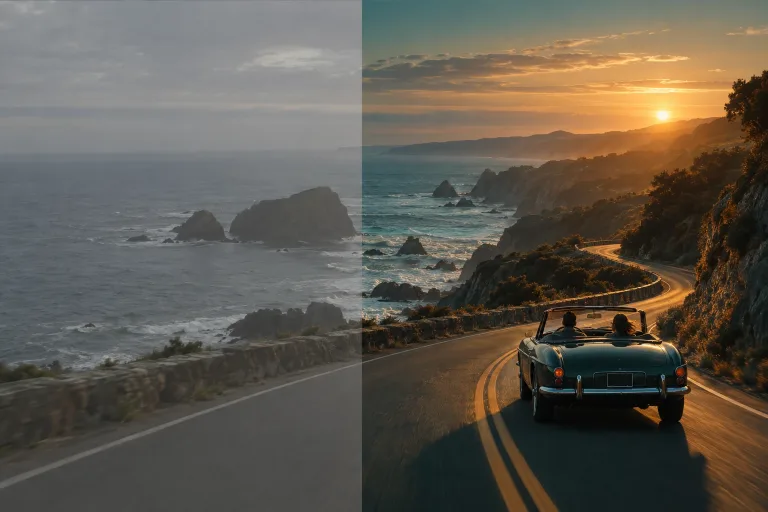
How to use AI Color Grading
Upload the photo to grade
Add the image under Your image: a sharp, well-exposed photo or a still frame from your footage. JPG, PNG or WebP up to 10 MB. Video files are not accepted here, so export the frame as an image first.
Pick a look or describe one
Choose Teal and orange, Vintage film, Clean commercial, Moody noir or Pastel under Style preset. Each one fills the text box. Or write your own in "Describe the look (or pick a preset)". For example: "cool shadows, warm skin, slightly faded blacks".
Say what must stay as it is
A strong look can also shift skin tones and colors you want to keep. Add a short line after the preset text or your own description. For example: "keep skin tones natural, keep the red dress red".
Compare, then keep it consistent
Press "Grade image" and check skin and white areas against the original. If the look is too strong, add "subtle" to the text. For a series, use exactly the same preset or wording on every photo.
What a real job costs here
The cheapest model on this page charges 12 credits and the most expensive 38 credits. At the best pack rate that is about $0.1277 up to $0.4044.
| Pack | Credits | Runs with FLUX Kontext |
|---|---|---|
| $9 | 750 | 62 |
| $19 | 1,650 | 137 |
| $39 | 3,500 | 291 |
| $79 | 7,300 | 608 |
| $149 | 14,000 | 1,166 |
Choosing between the models on this page
FLUX Kontext: Cheap targeted edits like color, light and small fixes. Instruction-based editing. Watch out for: large structural edits work better on GPT Image 2.
GPT Image 2 (medium): Posters, menus, interfaces and any image with readable text. Typography that stays readable at small sizes. Watch out for: not the most photoreal option.
GPT Image 2.5: Edits and product shots where the subject must stay recognizable. Sharper detail and more natural light. Watch out for: small, dense text can still break.
Nano Banana Pro: Hero images where realism decides the result. Photoreal skin and texture. Watch out for: higher rate than everyday image models.
Color is what makes it read as cinema
Framing and lighting get you most of the way. Color does the rest. A grade unifies mixed sources into one consistent look.
Presets are the shortcut
Teal and orange, Vintage film, Clean commercial, Moody noir and Pastel. A preset replaces the text box with a written grade, which you can then push further in words.
Grade a whole set the same way
Run the same preset across a shoot and the images finally look like a series. That consistency is what clients notice first.
Frequently asked questions
Does it change the content?
The model is asked to change only color and contrast, but it redraws the whole image. Check faces, text and small details against the original.
Can I match an existing look?
Describe the reference in words. Naming the film stock or the mood usually gets close.
What does one image cost?
It depends on the model: FLUX Kontext 12 credits, GPT Image 2 (medium) 14, Nano Banana Pro 38. The price is shown on the button before you run it.
