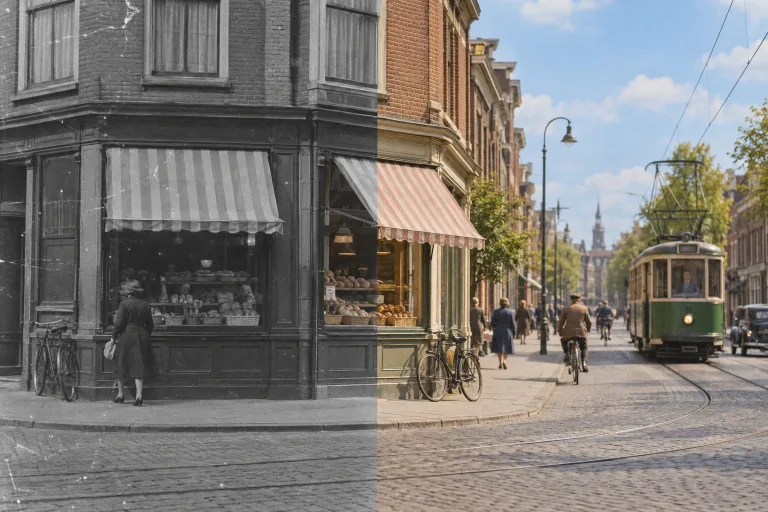
How to use Photo Colorizer
Upload the black and white scan
Add the photo under "Your image" (JPG, PNG or WebP, up to 10 MB). Check the consent box: everyone shown must have agreed. If the print is scratched or stained, restore it first, because damage and grain confuse the color guess.
Pick a preset, name known colors
A chip under "Style preset" fills "Notes (optional)" with a color mood. Then add what you know, e.g. "the dress was dark green, the car red". Named colors override the model's guess. Leave the box empty and the photo gets natural colors.
Match the format to the photo
Under "Format", choose the shape closest to the original: "Square 1:1", "Landscape 3:2" or "Portrait 2:3". The result comes out in that shape, and Square is selected by default.
Compare with the original
Press "Colorize photo" and judge the skin tones on a close crop, then the clothes and sky. The colors are a plausible guess, not a record. If one is wrong, name it in the box and run again. Keep the original scan either way.
What a real job costs here
The cheapest model on this page charges 14 credits and the most expensive 19 credits. At the best pack rate that is about $0.1490 up to $0.2022.
| Pack | Credits | Runs with GPT Image 2 (medium) |
|---|---|---|
| $9 | 750 | 53 |
| $19 | 1,650 | 117 |
| $39 | 3,500 | 250 |
| $79 | 7,300 | 521 |
| $149 | 14,000 | 1,000 |
Choosing between the models on this page
GPT Image 2 (medium): Posters, menus, interfaces and any image with readable text. Typography that stays readable at small sizes. Watch out for: not the most photoreal option.
GPT Image 2.5: Edits and product shots where the subject must stay recognizable. Sharper detail and more natural light. Watch out for: small, dense text can still break.
Color is a guess, and that is fine
The model infers plausible colors from context: skin, sky, fabric, foliage. It is an interpretation of the scene, not a record of it.
Say what you know
If you remember the dress was green, write it. Named colors override the model's guess and make family photos feel right.
Restore first, colorize second
Damage and grain confuse color inference. Run the restoration pass first, then colorize the cleaned image.
Frequently asked questions
Will the colors be accurate?
Plausible rather than accurate. Name colors you know to correct it.
Does it handle faces well?
Skin tones are the strongest part of the model. Judge on a close crop.
Should I keep the original?
Always. Colorization creates a new interpretation and does not replace the archive scan.
Can it colorize a black and white photo?
That is exactly what it does. Upload the scan and pick a color mood, or name colors you remember.
