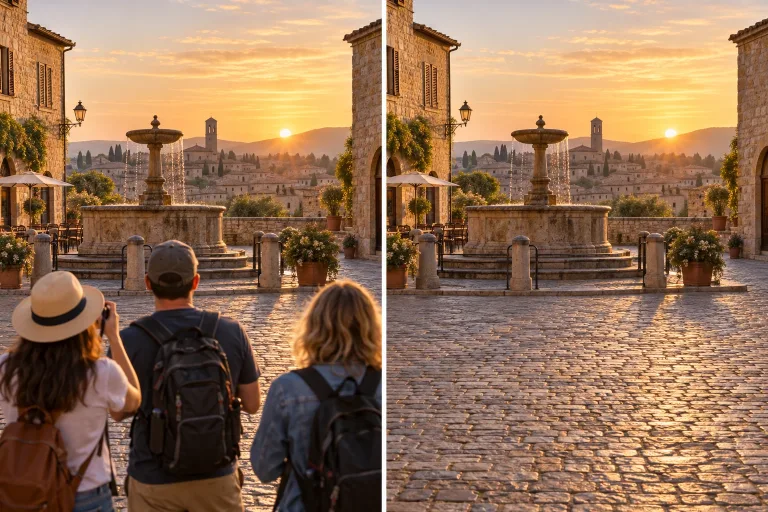
How to use Remove Person
Upload a photo you may edit
Under "Your image", add a photo you have the right to edit. Use JPG, PNG or WebP, up to 10 MB. A single person against a wall, sky or grass disappears most cleanly. A busy square needs several passes.
Point to the person by position
In "Which person should go?", describe the person by position and clothing, not by name. For example: "the man in the red jacket on the left". If someone must stay, name them too: anything you do not mention may be reinterpreted.
Match the format to your photo
Under "Format", pick the shape closest to your photo: "Square 1:1", "Landscape 3:2" or "Portrait 2:3". The result comes out in that shape, and Square is selected by default.
Check the edges, then repeat
Press "Remove person" and look where the person overlapped other people or repeating architecture such as windows or railings. If the edges look smeared, run it again; in a crowd, remove fewer people per pass.
What a real job costs here
The cheapest model on this page charges 14 credits and the most expensive 19 credits. At the best pack rate that is about $0.1490 up to $0.2022.
| Pack | Credits | Runs with GPT Image 2 (medium) |
|---|---|---|
| $9 | 750 | 53 |
| $19 | 1,650 | 117 |
| $39 | 3,500 | 250 |
| $79 | 7,300 | 521 |
| $149 | 14,000 | 1,000 |
Choosing between the models on this page
GPT Image 2 (medium): Posters, menus, interfaces and any image with readable text. Typography that stays readable at small sizes. Watch out for: not the most photoreal option.
GPT Image 2.5: Edits and product shots where the subject must stay recognizable. Sharper detail and more natural light. Watch out for: small, dense text can still break.
Describe by position, not by identity
The person on the left, the man in the red jacket. Position and clothing are what the model can act on.
Crowds are harder than one passerby
A single person against a wall vanishes cleanly. A busy square needs several passes, each naming fewer people.
Say what has to stay
If someone must remain, name them. Everything you do not mention is at risk of being reinterpreted.
Frequently asked questions
Can it remove someone from a group photo?
Yes, but check the edges where they overlapped others. Overlaps are the hard part.
Is the result convincing?
On plain and natural backgrounds usually yes. Repeating architecture can need a second pass.
Should I use this on other people's photos?
Only if you have the right to edit them. Removing people from someone else's image can be misleading.
What does GPT Image 2 (medium) cost here?
14 credits per image. The exact total appears above the button before you generate.
