What it is good at
- Photoreal skin and texture
- 2K by default
Google · Image · 38 credits per image
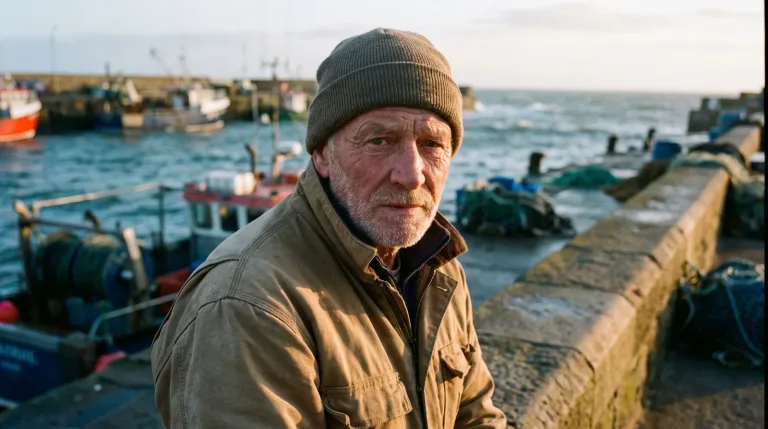
Pick Nano Banana Pro for the one image that has to convince: a headshot, a product hero, a try-on. It renders at 2K by default and costs 38 credits per image.
38 credits per image.
Nano Banana Pro is the top of Google's image family on Ugesi. It is the engine behind more tools than any of its siblings. Its edge is photoreal skin and texture. A cheaper model fails there first in a headshot, a fashion image or a product close-up.
It also reads a reference image, a resolution setting and an aspect ratio. The ratios offered are 1:1, 4:5, 16:9 and 9:16. You can frame for a square profile picture, a portrait feed post, a widescreen banner or a vertical story.
For profile photos without uploading anything, use AI Headshot Generator with the LinkedIn or Studio preset. To put a garment on a person, Virtual Try-On takes your photo plus a clothing image. Full outfit and Top only are the common presets. AI Clothes Changer works similarly, with presets such as Business suit and Winter coat.
For product sellers, AI Image Editor offers Product on white and Remove logo. AI Relight changes the light with presets like Golden hour or Studio key. Expand Image adds room around a shot with More on the sides or More above and below. For a fresh image from text, AI Image Generator has Product on marble, Food shot and Cinematic portrait.
Ask for the things cheaper models blur. Try "Close-up portrait of a woman in her sixties, natural freckles and fine lines, soft window light. Linen shirt, neutral gray background, 4:5." For products: "Leather wallet on dark walnut, visible grain and stitching, single soft key light from the right, 1:1."
When you attach a reference, say plainly what must not change. That might be the face, the logo or the product shape.
Its only listed limit is price. Out of 41 image models priced per image, this is the most expensive, sitting at the 38-credit ceiling. The easy saving is to explore on Nano Banana 2 at 26 credits or FLUX 2 [max] at 16. Switch to Pro only once the composition is settled.
For images that are mostly text, such as a menu or a poster, pick GPT Image 2 (medium). It is the better tool and, at 14 credits, costs far less.
One image costs 38 credits, about $0.40 at the best pack rate. A set of ten separate headshots or product angles is 380 credits, roughly $4.04. The 750-credit pack for $9 covers that set.
| Pack | Credits | Runs |
|---|---|---|
| $9 | 750 | 19 |
| $19 | 1,650 | 43 |
| $39 | 3,500 | 92 |
| $79 | 7,300 | 192 |
| $149 | 14,000 | 368 |
curl -X POST https://ugesi.com/api/generate \
  -H "Authorization: Bearer YOUR_API_KEY" \
  -H "Content-Type: application/json" \
  -d '{
    "model": "nano-banana-pro",
    "prompt": "a product shot on white marble"
  }'
<?php
$ch = curl_init('https://ugesi.com/api/generate');
curl_setopt_array($ch, [
CURLOPT_POST => true,
CURLOPT_RETURNTRANSFER => true,
CURLOPT_HTTPHEADER => [
'Authorization: Bearer YOUR_API_KEY',
'Content-Type: application/json',
],
CURLOPT_POSTFIELDS => json_encode([
'model' => 'nano-banana-pro',
'prompt' => 'a product shot on white marble',
]),
]);
$response = json_decode(curl_exec($ch), true);
curl_close($ch);
print_r($response);type GenerateRequest = {
model: string;
prompt: string;
};
type GenerateResponse = {
job_id: number;
job_token: string;
credits_held: number;
status: "queued" | "succeeded";
output_text?: string;
};
const body: GenerateRequest = {
model: "nano-banana-pro",
prompt: "a product shot on white marble",
};
const resp = await fetch("https://ugesi.com/api/generate", {
method: "POST",
headers: {
"Authorization": `Bearer ${process.env.UGESI_API_KEY}`,
"Content-Type": "application/json",
},
body: JSON.stringify(body),
});
if (!resp.ok) throw new Error(`HTTP ${resp.status}`);
const job = (await resp.json()) as GenerateResponse;
console.log(job.job_id, job.status);import requests
resp = requests.post(
"https://ugesi.com/api/generate",
headers={"Authorization": "Bearer YOUR_API_KEY"},
json={
"model": "nano-banana-pro",
"prompt": "a product shot on white marble",
},
timeout=60,
)
resp.raise_for_status()
print(resp.json()){
"model": "nano-banana-pro",
"prompt": "a product shot on white marble"
}The API comes with every credit pack, from Lite to Enterprise, and uses the same balance as the website. API documentation and access →
Outputs made with paid credits can be used commercially. The maker's own rules for Nano Banana Pro also apply (Google Generative AI Prohibited Use Policy). The full rules are in our Terms of service.
2K by default. That gives enough detail for close crops, large banners and print-sized layouts. In most cases, no extra upscale step is needed.
Four ratios are offered here: 1:1, 4:5, 16:9 and 9:16. Pick 4:5 for portrait feed posts, 9:16 for stories and vertical video covers, and 16:9 for banners and slides.
Not in AI Headshot Generator, which takes no upload and works from presets such as LinkedIn, Studio or Outdoor. Tools like AI Relight, Virtual Try On and AI Photo Editor do need your photo.
When the image is viewed large or close, yes: skin and fabric texture are finer. For feed-size volume work, Nano Banana 2 at 26 credits is usually enough.
Pay only for what you generate. New accounts start with free credits, no card needed.
Start for freeEssential cookies keep you signed in and protect forms. With your consent we also use statistics: where visits come from (for example a campaign) and which tools work. You can change your choice at any time under “Cookie settings” in the footer. Cookie policy
Essential (always on)
Sign-in, form security and remembering this choice.
An anonymous visit ID and the campaign source (utm), so we know what works. This data stays with us.
