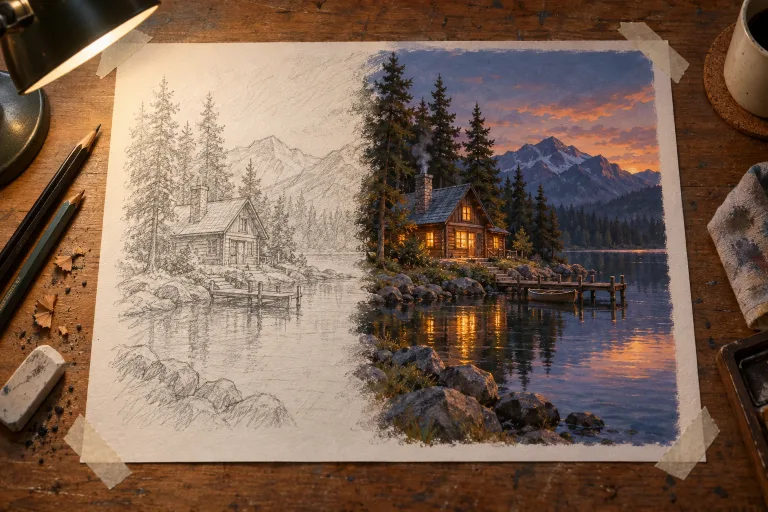
How to use Sketch to Image
Upload a readable sketch
Add the drawing under "Your image" (JPG, PNG or WebP, up to 10 MB). Clean lines render most predictably, but a rough sketch works if the shapes are readable. For a photo of paper, shoot it flat in even light and crop to the drawing.
Say what it is made of
The "Describe the finished image" box is optional: left empty, the sketch becomes a finished full-color illustration. For anything else, name the materials and the light, e.g. "brushed steel desk lamp, white studio background, soft light".
Or start from a style preset
Chips under "Style preset", such as "Photoreal", "Product render" or "Watercolor", fill the box with a full description. The description keeps your composition. A chip replaces what you typed, so pick it first, then add your subject and materials.
Check proportions, change one thing
Press "Render the sketch" and compare shapes and proportions with your drawing. If it drifts, remove heavy style words and change one thing at a time. To change the layout itself, edit the drawing: the composition comes from the sketch, not the text.
What a real job costs here
Runs on this page cost 12 credits. At the best pack rate that is about $0.1277.
| Pack | Credits | Runs with FLUX Kontext |
|---|---|---|
| $9 | 750 | 62 |
| $19 | 1,650 | 137 |
| $39 | 3,500 | 291 |
| $79 | 7,300 | 608 |
| $149 | 14,000 | 1,166 |
What this model is good at and where it stops
FLUX Kontext: Cheap targeted edits like color, light and small fixes. Instruction-based editing. Watch out for: large structural edits work better on GPT Image 2.
The sketch is the composition
Layout, proportion and pose come from your drawing. The model supplies material, light and finish, which is the part that takes hours by hand.
Name the material and the light
A mug sketch can render as ceramic, steel or glass. Name the material and the lighting, and the render stops guessing.
Rough is fine
Clean line work renders most predictably, but a rough thumbnail works too. What matters is that the shapes are readable.
Frequently asked questions
Will it keep my proportions?
Mostly. Heavy stylistic instructions pull it further from the sketch, so change one thing at a time.
Can I use a photo of paper?
Yes. Shoot it flat with even light and crop to the drawing.
How is this different from image to image?
Same family, narrower intent. This page assumes your input is a drawing and the output should be finished.
What does FLUX Kontext cost here?
12 credits per image. The exact total appears above the button before you generate.
