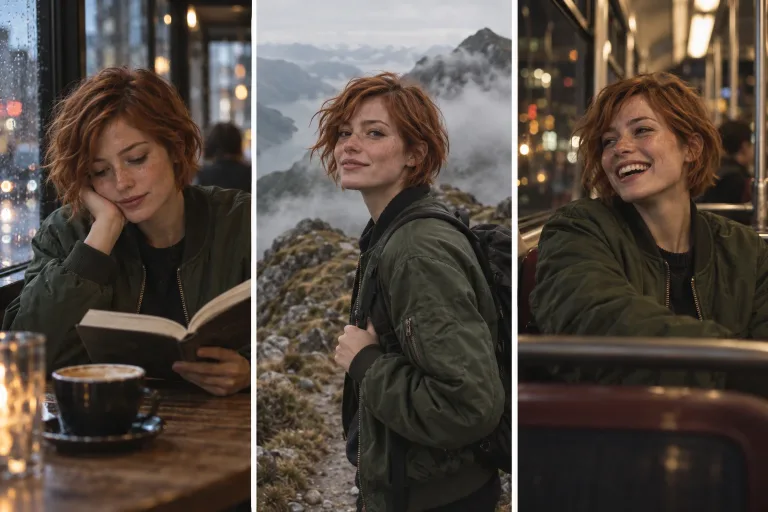
How to use Consistent Character
Upload a clear reference face
Add the face under Your image: one person, facing the camera, sharp and evenly lit. There should be no sunglasses or hair across the face. JPG, PNG or WebP up to 10 MB. The new scenes take the identity from this photo.
Confirm consent, pick a scene
Check the consent box: use your own face, a generated one or one you have permission to use. Then pick Studio portrait, Street style, Office, Beach, Gym or Evening event under Style preset. It fills the text box, replacing what was there.
Describe what changes
In "Describe the new scene", start with "same person" and add place, outfit, light and framing. For example: "same person, reading at a cafe window, morning light, medium shot". Describe the scene, not the face.
Compare the faces side by side
Press "Generate scene" and compare the face with your reference at the same size. If it drifts, use a sharper front-facing reference and a closer framing such as a medium shot. Wide shots leave less of the face to match.
What a real job costs here
Runs on this page cost 4 credits. At the best pack rate that is about $0.0426.
| Pack | Credits | Runs with Consistent Identity |
|---|---|---|
| $9 | 750 | 187 |
| $19 | 1,650 | 412 |
| $39 | 3,500 | 875 |
| $79 | 7,300 | 1,825 |
| $149 | 14,000 | 3,500 |
What this model is good at and where it stops
Consistent Identity
Identity is the hard part
Prompts alone drift. A reference image anchors the face so the same character survives across a whole content calendar.
Built for the influencer workflow
Design the persona once. Then shoot a scene grid without regenerating the face every time.
Consent applies here too
Use your own face, a generated one or a face you have permission to use. The consent box is enforced.
What a run costs here
4 credits per image. The exact total sits above the button before you generate.
Frequently asked questions
How is this different from the character generator?
The character generator designs a face from text. This tool takes an existing face into new scenes.
Can I use a real person?
Only with their permission. Non-consensual use breaks the terms.
Can I animate the result?
Yes. Send it to image-to-video from the next-step buttons.
How many credits does one new image of the same character take?
4 credits per image. The exact total appears above the button before you generate.
