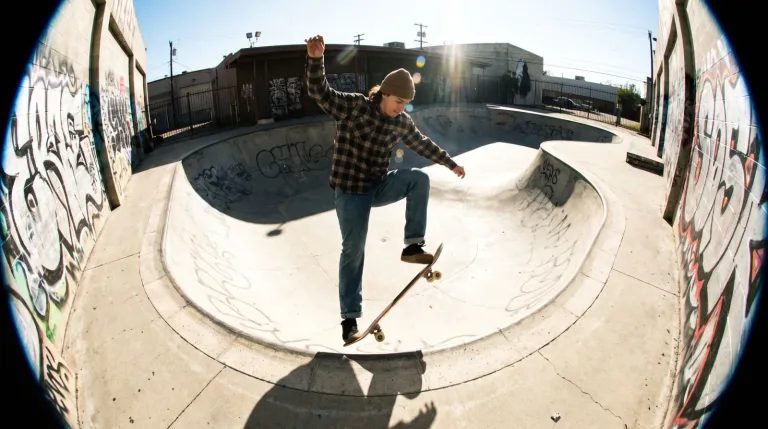
For skate, street and music-video looks built from one photo. The preset adds barrel distortion and a fast close pass. Pick a source with straight lines and a subject that can take some bending.
What this preset does
The move is the shot. Video models read camera language, so naming the movement changes the result more than any extra adjective.
The prompt behind it
The prompt is written in English because models follow English most reliably. You can edit it in any language, but English usually gives the most predictable result.
fisheye lens distortion, wide close pass
More effects
Fisheye runs in AI Camera Motion at 12 credits per second. The preset is filled in for you and the exact cost shows before you generate.
Sources that bend well
Upload a single image with architecture in it: a stairwell, a shop front, a tiled room, a ramp. Straight lines near the frame edge are what make barrel distortion visible. A subject in full figure, rather than a tight face crop, gives the fast pass room to swing by. That way, no single enlarged feature fills the frame.
Turning the sweep up or down
The preset asks for one fast arc that comes close past the subject. For a classic skate-video follow, change that line. Write "low fisheye angle near the ground, camera tracks alongside the rider, ramp edge bending across the frame". For a gentler version, replace "strong barrel distortion" with "mild wide-angle distortion" and "fast arc" with "slow drift". For a music-video feel, add "camera circles the performer at arm's length, slight handheld shake".
Length and frame for a fast move
A fast arc is short by nature. 4 seconds keeps it punchy, and 6 leaves time for a settle at the end. 8 often adds empty motion after the pass. Fisheye looks wider in 16:9, where the bending edges have room. In 9:16 the effect gathers at top and bottom, which can stretch heads and feet. Pick 720p for testing angles and 1080p for the take you keep.
Spotting distortion that went wrong
Good fisheye bends lines smoothly and keeps the center crisp. Watch for lines that kink instead of curving and faces that warp as they cross the edge. Also watch for lettering on signs turning into nonsense. Lower detail is the listed limit of Veo 3.1 Lite. As a result, fine textures like grip tape or brickwork may smear during the fast part of the move. Judge it at playback speed before rerunning.
Credits for a fisheye clip
The rate is 12 credits per second. A 4-second sweep costs 48 credits, about $0.51 at the best pack rate. A 6-second one costs 72 credits, and an 8-second one 96. Native audio comes with each clip, and for a skate edit you will probably replace it with music.
When the angle is right but a fast move needs more detail, consider Kling 3.0. At 27 credits per second, it is listed for action where physics has to look right. Seedance 2.0 Fast at 18 is listed for drafting before a flagship render.
What Fisheye actually changes
Bends straight lines outward from the center, the way a very wide lens does. Verticals near the edge lean in.
When it works and when it does not
Works on scenes with obvious straight lines: rooms, streets, skate spots. The distortion needs something to bend.
Fails on close portraits, where it enlarges the nose and shrinks the ears into something nobody asked for.
Getting a better result
Put the subject dead center. The middle of a fisheye frame stays closest to normal, so faces survive there.
Questions about Fisheye
Will the fisheye preset distort faces?
Faces near the frame edge stretch, and a close pass enlarges whatever is nearest the lens. Keep the person in the center of the uploaded photo. If the face still bends too much, lower the strength in the prompt.
Can I use fisheye on a vertical video?
Yes, 9:16 is available alongside 16:9. The bending is pushed to the top and bottom of a tall frame. So leave space above the head and below the feet in your source photo.
How much does a fisheye clip cost?
12 credits per second on Veo 3.1 Lite. That makes 48 credits for 4 seconds, 72 for 6 and 96 for 8. Failed runs return their credits.
